

Parked your Tesla and wondering how to switch it off? Select Park, get out and take your key. The car handles the power. If you used a key card, tap it against the driver’s door pillar to lock up.
I’d been in the motor trade for 30 years when I collected our first Model 3 in Leeds. Tesla handed me a key card. Half an hour later I was back in the showroom asking how to open the door. Then I had to work out how to start it. If you’re standing next to yours feeling much the same, pick the question below. I’ve included the differences that matter on UK Model 3s and Ys, with separate manual links for S and X owners. How our first Tesla handover went.
Find an answer in 30 seconds
Which Tesla have I got?
Open Controls → Software in the car. Note the model, VIN and software version. Open Additional Vehicle Information for equipment details. A UK registration plate tells you when the car was registered. Two cars on the same plate can have different controls.
- Model 3: original shape, 2017–2023 manual · refreshed shape, 2024+ manual (often called Highland). Earlier cars use a drive stalk. The refreshed car has a drive selector on the touchscreen.
- Model Y: original shape, 2020–2024 manual · refreshed shape, 2025+ manual (often called Juniper). A 2025 registration can be either shape. Look at the car and its onboard manual.
- Model S or X: open the manual in your car. Door releases, keys, suspension and recovery procedures can differ substantially from a 3 or Y.
Locking, phone keys and a black screen
How do I know it actually locked?
Close every door and the boot. With a paired phone key, enable Controls → Locks → Walk-Away Door Lock. Check whether Home is excluded. With a key card, tap the driver’s pillar yourself. Look for the locked padlock in the app. Testing the handle with your paired phone still in your pocket can unlock it again.
My phone plays music, but the car says “key not detected”.
Music pairing and phone-key setup are separate. In the Tesla app select your car and set up Phone Key. Allow Bluetooth and the background permissions the app requests. If you’re stuck outside now, use the card on the pillar. Once inside, press the brake. If prompted, put the card on the interior reader shown on the screen. On an earlier Model 3 it’s behind the cupholders. On the refreshed Model 3 it’s in the wireless charging area. Keep a card in your wallet when travelling.

View the official diagram: the key card held against the driver’s door pillar.
The touchscreen is black or frozen. What do I press?
If driving, pull over safely first and select Park. On Model 3/Y, hold both steering-wheel scroll buttons until the screen goes black, then release. Allow about 30 seconds for it to restart. The speed display, reversing camera and warnings are unavailable during the restart. If the screen stays black or repeatedly fails, arrange service before relying on the car.
Is there a proper power-off command?
For everyday parking, just leave the car in Park. For unusual behaviour, park safely and choose Controls → Safety → Power Off. Sit still for at least two minutes without opening a door, pressing the brake or touching the screen. Press the brake to wake the car. This troubleshooting step is different from restarting the display.
Tesla touchscreen guide · Power cycling · Watch Tesla demonstrate the key card (from 0:42)
Charging at home and on the motorway
Should I charge to 80% or 100%?
Open Charging in the car and use the daily limit recommended for your battery. If it recommends 80%, use that for ordinary days and schedule a higher charge to finish near departure for a long trip. Some lithium iron phosphate (LFP) cars give different full-charge instructions. Follow the frequency shown in your car. On a supported Model 3, check Controls → Software → Additional Vehicle Information for the LFP entry. “Rear-wheel drive” alone doesn’t identify the battery.
I plugged in last night. Why didn’t it charge?
First check the battery is below the limit. Read the car’s charging message. Then check who controls the start time: the car, the wallbox or your energy supplier. A wallbox waiting for cheap electricity and a car waiting for a different time slot may never overlap. For a short test, use the wallbox or tariff provider’s “charge now” override and tell the car to start. Check the price first. Once charging works, give one system control of the schedule.
Why does my 7 kW home charger only show about 1.4 kW?
Look at the amps. On a single-phase supply, 230 V × 6 A is about 1.4 kW. A solar-surplus or eco setting can deliberately offer that little. Check the wallbox mode, the car’s current setting and any load-sharing message before booking the car in. Leave installer-set limits alone. A connector that is hot, damaged or repeatedly faults needs inspection.
What do the charge-port colours mean?
Blue: connected and waiting. Flashing blue: communicating. Flashing green: charging. Solid green: finished. Solid amber: check the plug is fully seated. Flashing amber: reduced AC current. Red: charging fault – read the touchscreen alert. A green light may go out after the car locks.
View the official diagram: Model 3 charge port opening at the left rear light.

How do I get a faster Supercharge?
Choose the actual Supercharger pin in the car’s navigation. Routing to the nearby services postcode can miss battery preparation. Check live availability and prices before committing, especially if reports say a site is closed. Arriving with a warm battery and a lower state of charge usually helps. Speed falls as the battery fills. Use the predicted arrival percentage at your next stop to decide when to leave. At a hotel or services, check the car park’s own signs for registration or time limits.
The cable won’t come out. How do I release it?
Stop charging, unlock the car and select Unlock Charge Port in Charging, or use the connector button if fitted. Support the plug’s weight and withdraw it straight. In frost, defrost the car first. If it remains latched, use the manual-release instructions for your exact car only after confirming charging has stopped. Keep clear of the connector contacts. A manual release cannot unlock the charger’s end of a public cable – call the operator.
Charging and manual release · Battery care · Watch the earlier Model 3/Y charging demonstration (5:27)
Tyres, punctures, alignment and jacking pads
What pressure should I put in my tyres?
Open the driver’s door and read the tyre label on the centre pillar. Check with a gauge before driving, ideally after the car has stood for three hours. Use the cold pressures for the fitted wheel and tyre combination. The maximum moulded on the sidewall is a different figure. Leave warm tyres alone if the only concern is that the reading rose after driving.
View the official diagram: Location of the Model 3 tyre pressure label on the driver’s door pillar.
I’ve inflated the tyre. Why is the warning still on?
First measure all four. If the same tyre loses pressure again, book a leak check. Some Teslas display individual pressures after driving. Others have indirect monitoring and require calibration after adjustment. If your car offers Controls → Service → Tire Pressure → Calibrate Tire Pressure, set all four correctly before starting the calibration. Resetting with an underinflated tyre teaches the car the wrong baseline.
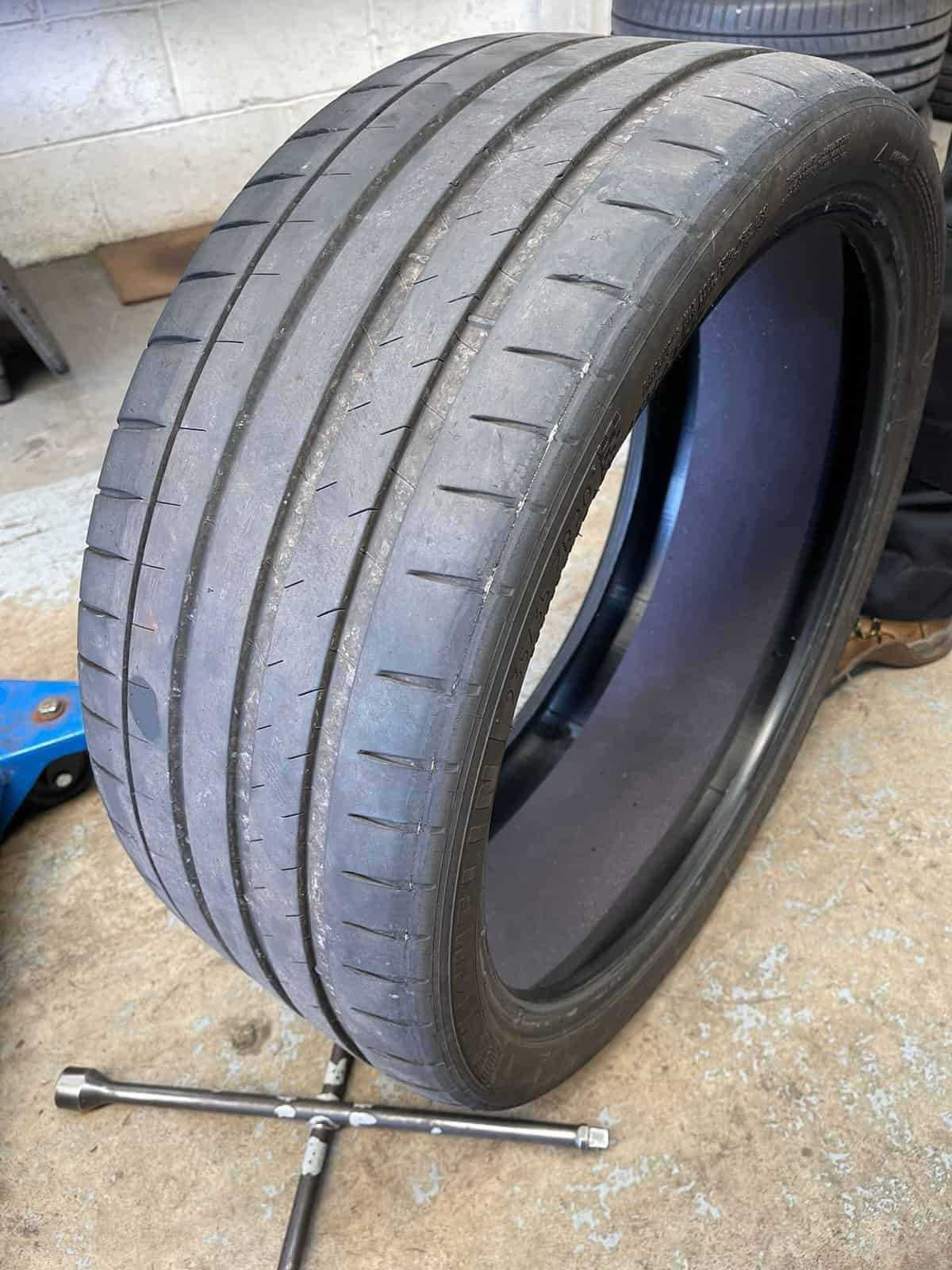
The outside tread looks fine. Why is the inner edge bald?
Ask the fitter to check the full width of all four tyres, including the inside shoulders. Uneven wear, a crooked steering wheel after suspension work or a persistent pull merit a tyre, suspension and four-wheel alignment check. Ask for the before-and-after readings. For vibration at a particular speed, describe the speed and ask about wheel balance too. Exposed cords, a bulge or rapid pressure loss mean stop using the tyre.
Can a puncture in a foam-lined EV tyre be repaired?
Sometimes. Give the fitter the exact make, model and size, mention the acoustic foam and say whether it was driven flat or treated with sealant. A tyre professional needs to remove it and inspect the inside, the puncture position and the maker’s repair rules. A screw in the centre tread may be repairable. Sidewall damage generally means replacement. If pressure is dropping quickly, stop safely and request recovery.
Can I rotate the wheels or buy any tyre of the same size?
Check both axles first. Some Performance versions have wider rear tyres and wheels, so front-to-rear rotation is unsuitable. Match the specified size, load and speed rating, and check direction markings. For replacement wheel covers, match the actual wheel design and diameter as well as the car model.
Do I need jack pucks? What should I show the tyre shop?
Open Jacking and Lifting in your car’s manual and show the fitter the four approved body lift points. Unplug the charge cable before lifting. Adaptors or “pucks” must suit the car and the lifting equipment. A puck in the wrong place still loads the battery or sill. The lift arm pads must bear only on the specified points. Never get underneath a car supported only by a jack. On an air-suspension Model S or X, the fitter must follow its Jack Mode procedure before lifting.
Tyres and pressure monitoring · Tesla UK lifting and MOT notes · TyreSafe puncture guidance
Windscreen fitting, cameras and wipers
My windscreen has cracked. What should I ask when booking?
Start with your insurer’s glass line if you intend to claim. Give the fitter the VIN and ask them to confirm the correct glass, camera bracket and any heating or acoustic features for that build. Ask who will handle the camera calibration, whether it is included, when the car can be driven and who to contact if a warning or leak appears. Check any approval or excess before agreeing to work outside the insurer’s network.
New glass fitted. Why are driver assistance features unavailable?
The forward cameras look through the windscreen. If their position changes, Tesla specifies clearing the existing calibration and completing a new one. Ask the fitter what they completed before pressing any reset yourself. On the refreshed Model 3, Tesla says learning often takes 20–25 miles in suitable conditions. Clear lane lines matter more than mileage alone. Drive normally, obey lane discipline and allow for unavailable safety features. If it still hasn’t completed after 100 miles in suitable conditions, contact Tesla. A loose camera mount or wrong glass needs inspection.
View the official diagram: Location of the forward camera area at the top of the Model 3 windscreen.
The camera warning only appears in rain, glare or darkness.
Clean the outside glass in front of the affected camera and check again in clear daylight. A warning that clears as conditions improve has a different cause to investigate from one that always names the same camera in good light. Record the wording, time and conditions for Service. Avoid opening the camera housing or clearing calibration to silence a visibility alert.
How do I lift the wipers without catching the bonnet?
In Park, turn the wipers off and choose Controls → Service → Wiper Service Mode. The blades move into reach. Lift only as far as the manual permits. When changing a blade, protect the glass with a folded towel and keep hold of the arm. Lower it gently before switching service mode off. For smearing, clean both the glass and blade edges first.
View the official diagram: Model 3 wiper blade release tab and direction of removal.
Tesla camera calibration · UK fitter’s recalibration guide
Frost, windows and disappearing range
The door handle is frozen. Can I pull harder?
Start Climate → Defrost Car in the app and allow time for the glass to drop normally. On supported cars the app’s Unlatch Door shortcut can pop the driver’s door without operating the handle. Don’t force a frozen frameless window past its trim. Tesla gives different ice-release techniques for black and chrome handles. Use the illustration for yours.
My window hits the trim or drops too far. Can I reset it?
Clear any ice or obstruction first. On a 2024+ Model 3, close the affected door and sit in the driver’s seat. Using the switch on the driver’s door, raise the affected glass fully, lower it fully, then raise it fully again, holding the switch until travel stops at each end. Keep fingers clear. If it still catches after a couple of attempts, book service. Check the Windows chapter for other builds.
View the official diagram: Four window switches on the Model 3 driver’s door.
Why is there a blue snowflake? Has the battery lost capacity?
It means part of the stored energy is temporarily unavailable while the battery is cold. Charging, acceleration and regenerative braking can be limited. Leave more braking distance and use the brake pedal as needed. Schedule departure preconditioning while plugged in. For a journey, use the navigation estimate of arrival percentage and watch it update as you drive.
How do I leave the car at the airport for a fortnight?
Leave a comfortable charge margin for the stay and the drive home. Switch off Sentry Mode for that location if you accept the security trade-off. Check climate settings and third-party apps that wake the car. If safely parked with charging available, follow the car’s recommended plugged-in limit. Compare percentage at similar temperatures. The range in miles can change with temperature, and a single overnight drop does not establish battery degradation.
Tesla UK winter guide · Window calibration · Energy and parked consumption
Judder, knocks, misted lamps and other warning signs
The steering wheel gives a little judder as I first pull away. Is it normal?
A brief brake-release noise after a wet night and a steering wheel that physically shakes are different symptoms. Note whether it happens on the first movement only, with the wheels turned, under braking or at a repeatable road speed. Tell Service exactly what you feel through the wheel. If steering effort changes, the car pulls sharply, vibration is severe or a steering/braking warning appears, stop safely and request assistance.
Can I identify a suspension arm from the noise?
A creak on steering lock and a knock over bumps give the workshop different clues. Neither identifies a failed part by itself. Note the side, speed, steering angle and whether the car was wet or cold. Ask for an inspection of joints, bushes, wheels and tyres. If the car has just had suspension work, mention that when booking.
There’s mist inside a light. Is it leaking?
A slight mist after washing the car can clear by itself. Take a photo when you see it and another after it’s had time to clear. On our first Model 3 the rear lamps needed replacing and Tesla did them on the drive. If yours has water collecting at the bottom or the light output is affected, send those photos with the service request. They’re better evidence than trying to describe yesterday’s mist to someone looking at a dry lamp today.
A warning disappeared before I could read it. What should I record?
If an alert disappears before you’ve found your glasses, park safely and open the alerts list. Save the whole code, wording and time, then look under Troubleshooting Alerts in your car’s manual. If it says stop safely or warns the car may not restart, follow the instruction. Leave any reboot until you understand the warning, especially if it mentions the brakes or steering.
A software update is taking ages. Can I drive?
Downloading and installing are separate. A slow download can be a Wi-Fi issue. Start installation when safely parked and when you can leave the car there for the time shown. The car cannot be driven during installation. If progress stays stuck or the same update repeatedly fails, record the version and message for Tesla Service.
Listen to Tesla’s normal operating sounds · Manual and alert-code lookup
Maintenance, car washes and everyday shortcuts
Does my Tesla need a service every year?
Use the maintenance schedule for the actual model. For the 2024+ Model 3, Tesla lists a cabin filter every two years and a brake-fluid health check every four years, with replacement if needed. Where winter roads are salted, Tesla specifies cleaning and lubricating the brake callipers every year or 12,500 miles, whichever comes first. Regenerative braking can leave the friction brakes relatively lightly used. Tell the workshop if a brake binds, vibrates or grinds.
Can I put it through an automatic car wash?
Tesla specifies touchless automatic washes for Model 3. With the car stationary and unplugged, select Controls → Service → Car Wash Mode. It closes the windows, locks the charge port and disables automatic wipers. For a conveyor that requires free-rolling wheels, hold the brake and select Enable Free Roll as directed. Confirm the screen shows free roll before the belt takes the car. Exit wash mode afterwards.
Which shortcuts are worth learning?
Find a setting: use search in Controls and type a word such as “wiper”. Warm up before leaving: schedule departure preconditioning. Save camera footage: with Dashcam recording to a compatible USB drive, tap its icon while driving when safe, or have a passenger do it. In Park the same icon opens the viewer. Save a copy of important clips before they can be overwritten.
Maintenance by model · Car Wash Mode · Dashcam
Doors without power, a dead car and recovery
How do I open a door if the electric button fails?
On Model 3/Y front doors, lift the mechanical release just ahead of the window switches. Show regular passengers where it is while parked. Use the electric button in normal use so the frameless glass can drop. Rear releases vary: a refreshed Model 3 has a release beneath a cover in the rear door pocket; some earlier Model Ys have no rear manual release. Check both rear doors against your own manual before you need them.
View the official diagram: Arrow identifying the Model 3 front mechanical door release.
The main battery had charge. Why is the whole car dead?
The low-voltage system powers locks and computers. The big battery can have charge while the car cannot wake. Older cars may have a lead-acid 12 V battery; later builds can have a lithium low-voltage battery and different connection points. If buying an inflator for the accessory socket, check its accepted input voltage and power rating against the car’s manual.
Can I open the bonnet with a flat low-voltage battery?
On the Model 3 illustrated in Tesla’s guide, leads behind the front tow-eye cover can release the bonnet latch when low-voltage power is lost. Those leads operate the latch only. Charging or supporting the low-voltage battery requires the separate procedure for your build. Open the illustrated manual on your phone before touching anything. If the car has been in a collision, is flooded, smokes or has visible battery damage, move clear and contact emergency services.
View the official diagram: Front bumper tow-eye cover on the refreshed Model 3.
What should I tell the recovery driver?
Give your exact location, model, whether the wheels will turn and whether the screen works. Tesla specifies transport with all four wheels off the road. A flatbed is the preferred option. Tow Mode (called Transport Mode on some versions) releases the parking brake for loading. On the current Model 3 it permits less than 10 metres at under 5 mph. Let the recovery operator secure the car before enabling it. With no usable screen or low-voltage power, the operator needs the manual’s dollies or tyre-skate procedure. If there is immediate danger, call 999. Otherwise request Roadside Assistance in the Tesla app or from your breakdown provider.
View the official diagram: Model 3 being transported on a flatbed recovery truck.
Refreshed Model 3 emergency releases · Earlier Model Y rear-door diagrams · Bonnet without power · Show the recovery operator · UK roadside assistance
Warranty, buying used and selling
What should I check before the warranty expires?
Open the Tesla app’s Specs & Warranty section and check both the date and mileage limit. The basic vehicle warranty and battery/drive-unit warranty are separate. Terms vary by model and delivery date. Test both keys, charging, windows, heating and air conditioning. Inspect lights for standing water and tyres for uneven wear. Log existing symptoms through Service with mileage, dates and photos before the relevant limit. Tesla assesses coverage for each issue.
I’m viewing a used Tesla. What should the seller demonstrate?

Ask to see the VIN and model on the touchscreen, the warranty details, both key cards if supplied and an actual charging session. Look across the whole tyre tread, operate each window and check the screen for outstanding alerts. Ask which charging cables, wheel covers and parcel shelf come with the car. Check what is purchased software and what is a subscription or trial. For a viewing checklist, see our UK used Tesla buying guide.
There’s finance on the car. What should I check?
For HP or PCP, ask the lender for a current written settlement figure and its sale or settlement process. Match the registration or VIN, agreement number, payee and expiry date. If you have several agreements with the same lender, check which one is secured on this car. Retain confirmation of settlement. For a lease, speak to the leasing company about its return or purchase options.
If you’re selling before your final PCP payment, our UK guide to selling a car on PCP explains your options.
I’m handing over the car. In what order do I do things?
Before collection: back up Dashcam footage and remove personal belongings and USB storage. At handover: once payment and any finance arrangements are confirmed, factory-reset the car while it is still on your account, then hand over the physical keys. In the Tesla app follow the remove/transfer vehicle process. Complete the separate DVLA keeper notification and keep confirmation. Adding someone as a driver gives them access; it doesn’t transfer ownership.
I bought privately and the car hasn’t appeared in my app.
Ask the previous owner to complete the transfer. If needed, use Add Product in your Tesla account/app and follow the proof-of-ownership steps. Have the VIN, identification and ownership documentation ready. Carry a working key card and plan an alternative way to charge until Supercharger access is confirmed.
Tesla UK warranty · Tesla app transfer · Tell DVLA · MoneyHelper settlement guide
Independent guide by EVBuyer.online, checked 25 November 2026. Questions were informed by a review of the Tesla Owners UK discussion group. We also included essentials for first-time owners. Procedures and illustrations are linked to Tesla’s vehicle-specific guidance. Software and equipment change, so use the manual in your own car when a control or diagram differs.
Leave a Reply